watsonx Orchestrate chat via API
watsonx Orchestrate includes a comprehensive REST API which can be used to build your own chat UI. In this blog you’ll learn how to use REST APIs to chat with an agent, and how differentiate between agents in multiple environments.
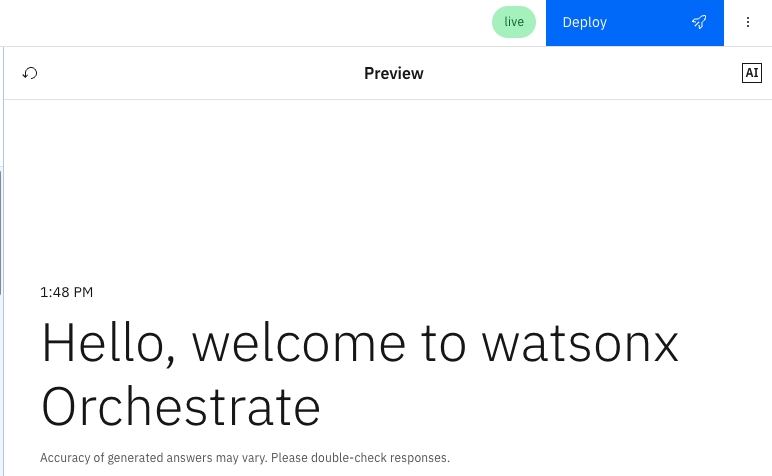
watsonx Orchestrate includes a Draft and Live environment. This enables you to develop and test an agent before publishing the changes to your users. In the Agent Builder UI, each agent features a green ‘live’ tile to indicate whether it is published to the Live environment. In the Agent Preview pane, a blue ‘Deploy’ button indicates that changes are pending publication in the Draft environment. Making a deployment copies the Draft versions of the agent configuration, tools, knowledge etc. A deployment can also be triggered (and rolled back) via the orchestrate CLI.
The steps below were tested with IBM Cloud. They will be similar for watsonx Orchestrate on AWS, apart from steps to generate authentication tokens.
Pre-requisites
- Generate an IAM API Key
- Find your watsonx Orchestrate Instance URL
Generate a token
1
2
3
4
5
curl -X POST \
 "https://iam.cloud.ibm.com/identity/token" \
 --header "Content-Type: application/x-www-form-urlencoded" \
 --header "Accept: application/json" \
 --data 'grant_type=urn:ibm:params:oauth:grant-type:apikey&apikey=<IAM_API_KEY>'
List all agents
1
2
3
curl --location 'https://<INSTANCE_URL>/v1/orchestrate/agents' \
 --header 'Authorization: Bearer <TOKEN>' \
 --header 'Accept: application/json'
Alternatively, use:
1
orchestrate agents list
Make a note of the agent’s “id”.
List all environments for your agent
1
2
3
curl --request GET \
  --url https://<INSTANCE_URL>/v1/orchestrate/agents/<AGENT_ID>/environment \
  --header 'Authorization: Bearer <TOKEN>'
If your agent is deployed to both Draft and Live, there will be two environments listed, each with an “id”. It’s really important to include this “id” when chatting via REST API (or the embedded web client), otherwise you will chat with the unpublished Draft agent by default.
Make a note of the environment’s “id”.
Chat with agent
1
2
3
4
5
6
curl --location \
  'https://<INSTANCE_URL>/v1/orchestrate/runs?stream=true&stream_timeout=120000&multiple_content=true' \
  --header 'Authorization: Bearer <TOKEN>' \
  --header 'accept: application/json' \
  --header 'Content-Type: application/json' \
  --data '{"message": {"role": "user", "content": "<Your message to the agent>"}, "agent_id": "<AGENT_ID>", "environment_id": "<ENVIRONMENT_ID>"}'
The environment_id is an optional parameter, but it is highly recommended to include it.
On subsequent requests, the –data should include a thread_id from the previous response to maintain context:
1
--data '{"message": {"role": "user", "content": "what is the top tourist attraction in London"}, "agent_id": "<AGENT_ID>", "thread_id": "<THREAD_ID>", "environment_id": "<ENVIRONMENT_ID>"}'
Note watsonx Orchestrate includes multiple alternative APIs to invoke agents, including /chat/completions which is very similar to the OpenAI /chat/completions endpoint.